Case study · UI/UX design · UK family money app
Bex,
for families.
A prepaid card and app for kids, an app for parents, and a Junior ISA for later. This was a redesign of an existing app, shipped after users complained and dropped off.
- Shipped
- Role · UI/UX designer
- 3 months
- Parent app · Child app · Junior ISA · CTF
- Light + dark
View the live site (opens in a new tab)
user activity after the core app redesign
adoption of the Junior ISA and CTF feature
app downloads driven by the redesign
UI/UX designer
The whole app: parent, child, Junior ISA and money flows.
Developers, a manager and a PM
Designed alongside the people who built and owned it.
3 months
For the whole app redesign.
01 · The problem
Families were leaving before Bex could help
A parent signs up, passes ID checks, links a bank and adds money. Only then can a child start. One bad step stalls the family.
Complaints about key steps and a high drop-off. Many families never reached a funded card, an active child or long-term savings.
Parents and children dropped out between download and a funded card. The design had to ask for less at the moments that need the most trust.
get a family from download to a funded card with fewer steps and less typing?
make moving money feel safe without slowing people down?
turn a spending card into a saving habit that lasts until 18?
02 · Research
What families needed from the journey
I started from the complaints and drop-off, then used a benchmark of UK kids' money apps and proto-personas to decide where the design had to work hardest.
The family journey · tap a step to see the screens
Link a child
- Scan a QR code or enter six digits
- If the parent can't be found, the child is asked to check the number and the parent gets a download link
Add money
- Pick a bank and approve in your own banking app
- Saved banks come back as cards
- Schedule or auto top-up
Send safely
- A partial name match is flagged in the field
- No match makes "Go back and edit" the main action
- The warning is repeated on the review screen
Come back
- Passcode pad with a fingerprint option
Save long-term
- Start per child from the parent's family screen
- CTF transfer in three steps, with Bex handling the paperwork
What parents already expect
Biometrics in the passcode pad.
Against GoHenry: fast return visits.
Scheduled and auto top-up.
Against Rooster Money: money on a schedule.
Open banking: pick a bank and approve.
Against Starling Kite: top up from your bank.
Spends, savings and goals in one place.
Against HyperJar · Revolut <18: pots and controls.
The gapNone of them made the long term easy. Bex could own it with a Junior ISA and a simple CTF transfer.
Two users, built from the complaints
 Parent
"I'll finish setting it up when I have ten minutes."
Mary, two kids. Wants cashless pocket money, visibility, and a start on saving.
Blocked by long set-up, typing bank details, doubt about where money went.
 Child
Child"Can I use it yet?"
Anika, 11. Wants her own card, a goal to save for, and tasks that earn.
Blocked by waiting on the parent to finish, and screens written for adults.
Proto-personas are assumption-based, not from interviews. Names come from the sample data in the designs.
03 · Approach
Four rules I designed against
One system, two apps
Shared top bar, input, button, PIN pad and options across the parent and child apps. Main action at the bottom.
Fewer fields
Let systems do the work: open banking to add money, Face ID or fingerprint to come back.
Design the unhappy paths
A name mismatch or a child who can't link gets a clear next step, not a dead end.
Make saving next
Junior ISA where parents already look. Paperwork for an old CTF handled for them.
04 · Two apps, one product
Every family action has two sides
Bex is a parent app and a child app that depend on each other. I designed them as one product, so what a parent does is visible to the child, and the other way round.
- LinkThe child scans a QR code or enters six digits to join the parent's account.
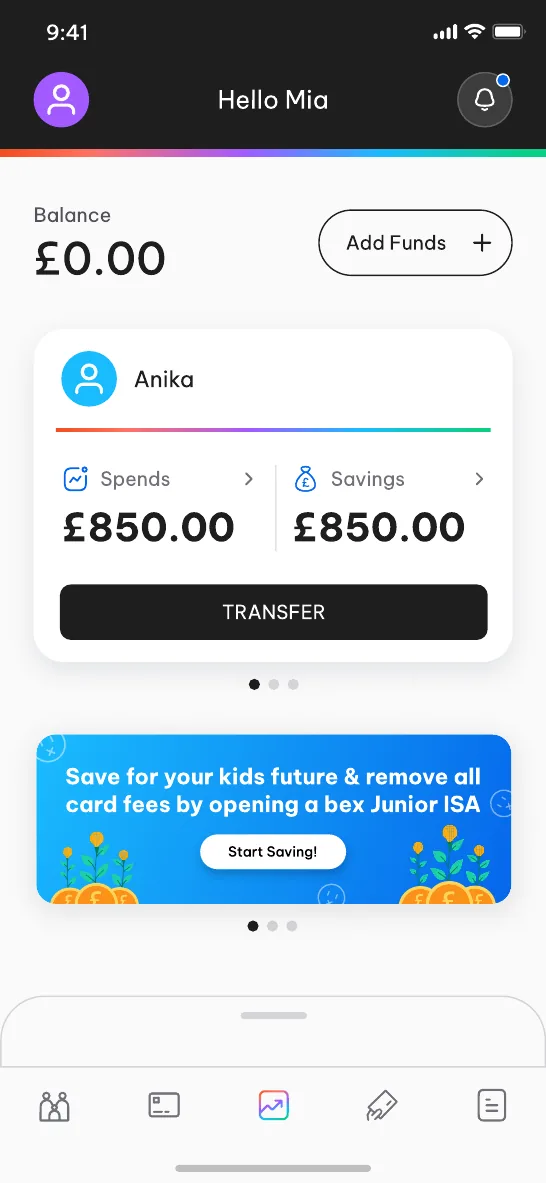
- FundThe parent adds money and moves it between a child's spends and savings.
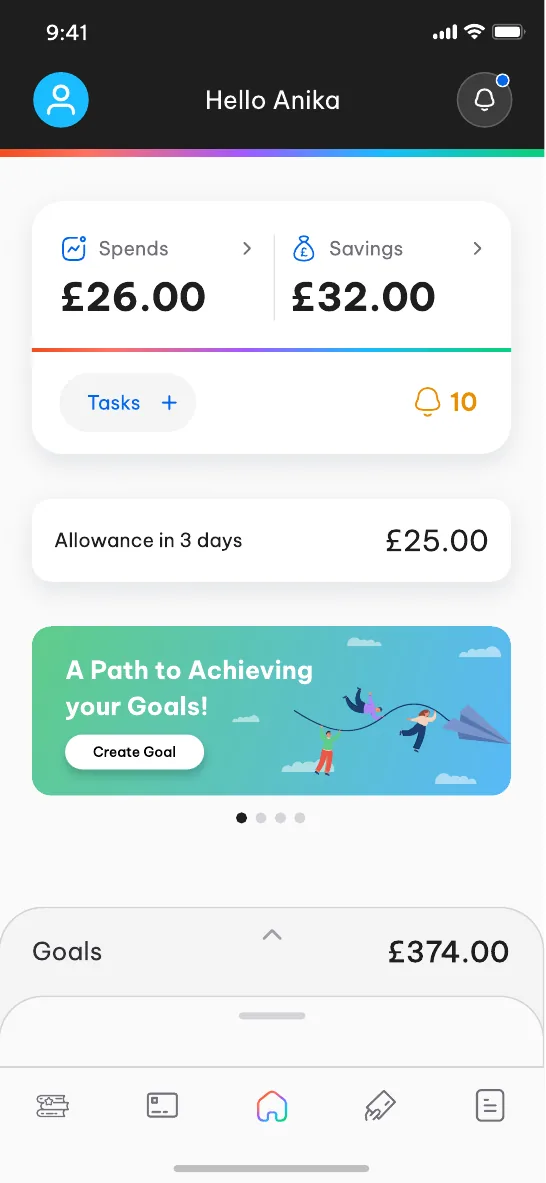
- UseThe child sees spends, savings, tasks, goals and when the next allowance arrives.
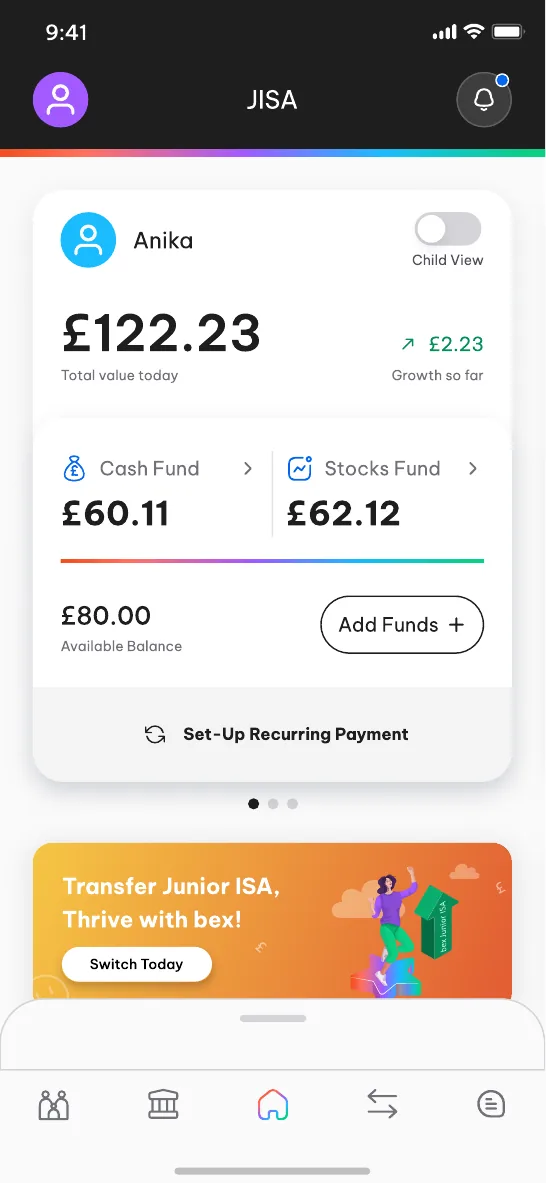
- GrowThe Junior ISA has a child view, so the same account reads for both people.
05 · Linking a child
Connecting a child never dead-ends
Scan or type six digits
A child links to their parent by scanning a QR code or entering a six-digit code. If Bex can't find the parent, the child isn't left with an error.
- 1
Scan the QR code or enter the six digits.
- 2
Parent not found? The child is asked to check the number.
- 3
The parent gets a download link, so the family can carry on.
06 · Adding money
From typing bank details to tapping your bank
Add funds · typing vs tapping
Pick your bank. Approve. Done.
Parents choose their bank and approve the payment in their own banking app through open banking. Saved banks come back as cards, so the next top-up is an amount and a tap.
- RecurringSchedule monthly, weekly or daily, or top up automatically when the balance drops below a chosen amount
One-off top-up
Recurring top-ups
07 · Saving for later · +47%
A Junior ISA parents actually open
Shown on the parent home with a reason to act (opening one removes card fees), four labelled steps, and CTF paperwork handled for them.
"Let bex handle everything for you."
08 · Sending money out
Catch the wrong account before money leaves
UK banks check that the payee name matches the account (Confirmation of Payee) and payments need strong authentication. Each result is its own state with one clear action.
Confirmation of Payee
The field flags itself in place
As the recipient name is typed, a partial match is flagged right in the form, before any decision.
One tap to use the name the bank holds
The sheet offers the name on the account, so the fix is a tap, not retyping.
The safe choice is the main button
"Go back and edit" is primary. Continuing anyway is secondary.
Warning repeated where the decision is made
The warning sits above Confirm and send, so it can't be missed.
Passcode or biometrics to authorise
Strong customer authentication without extra screens.
09 · Learning for kids
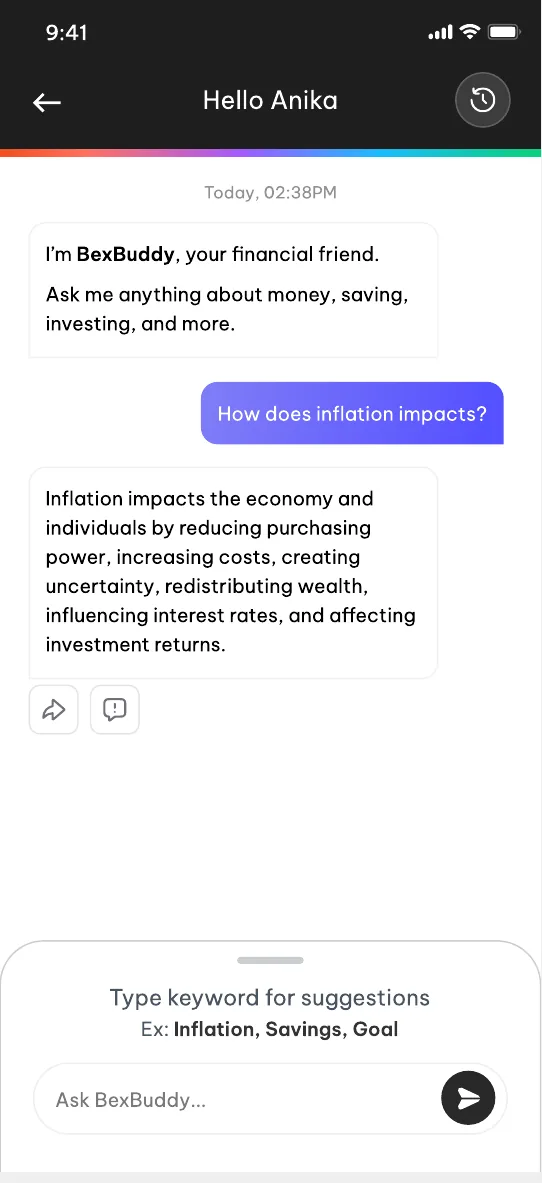
BexBuddy, an AI guide that knows its limits
The best feature is what it won't do
Typing a keyword shows suggested questions, so there is no blank chat box. Past questions are saved and filtered by topic.
10 · The system
Key flows in light and dark
One component library for both apps: top bar, input, button, PIN pad and option control, designed in light and dark.
Appearance
Outcome
It shipped, and families stayed.
overall user activity
Junior ISA and CTF adoption
downloads driven by the redesign
Bex app redesign · Product design case study · Screens use sample data