Case study · UI/UX design · B2B SaaS homepage
Chat360,
said plainly.
Chat360 sells AI agents that talk to customers on WhatsApp, the web, social and voice. The old homepage listed channels. I redesigned it to show what the product does for a business, and to prove it.
- Live at chat360.io
- Role · UI/UX designer
- Solo
- 1 month, audit to launch
View the live site (opens in a new tab)
Drag to compare the hero · before and after
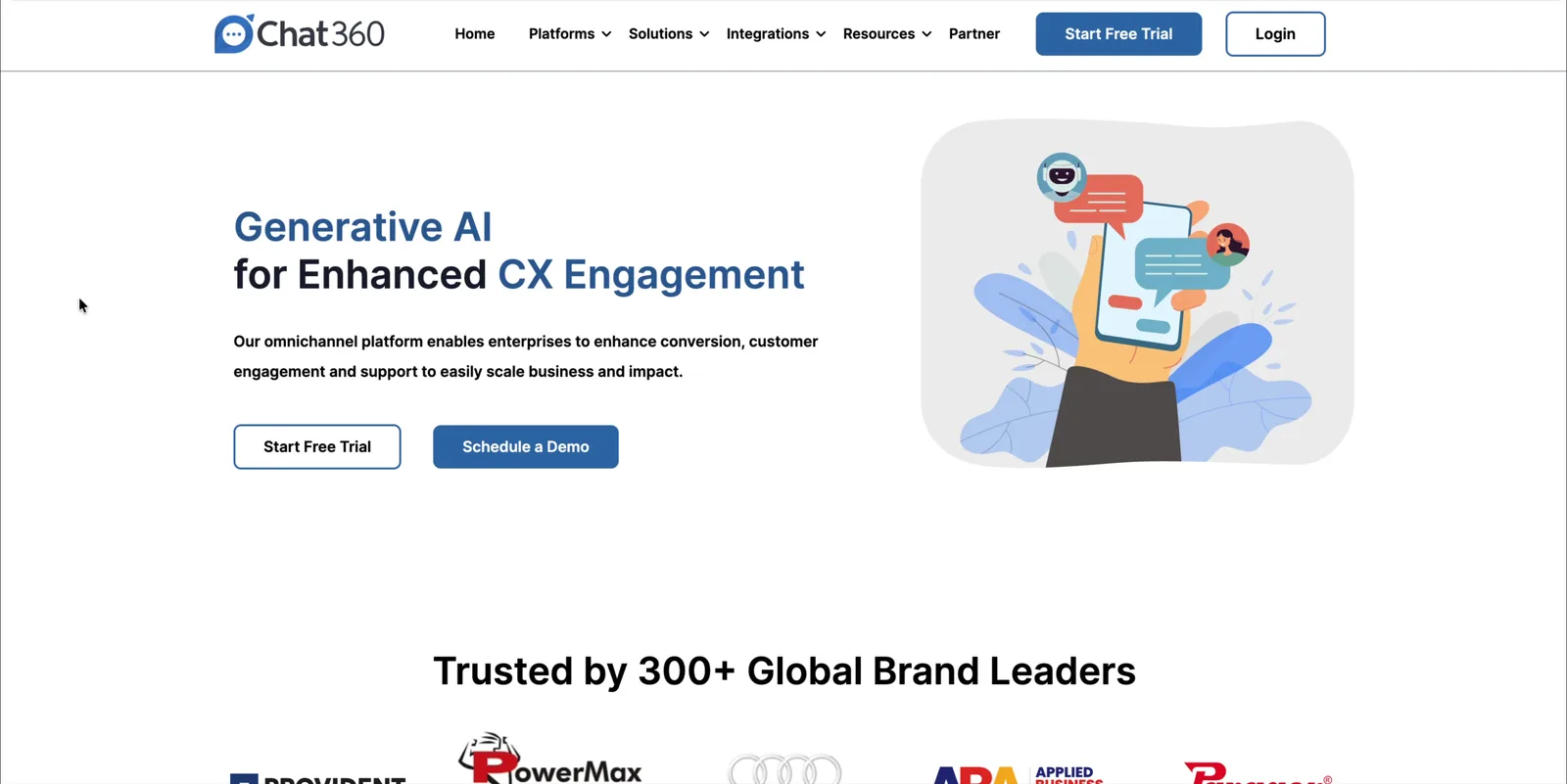
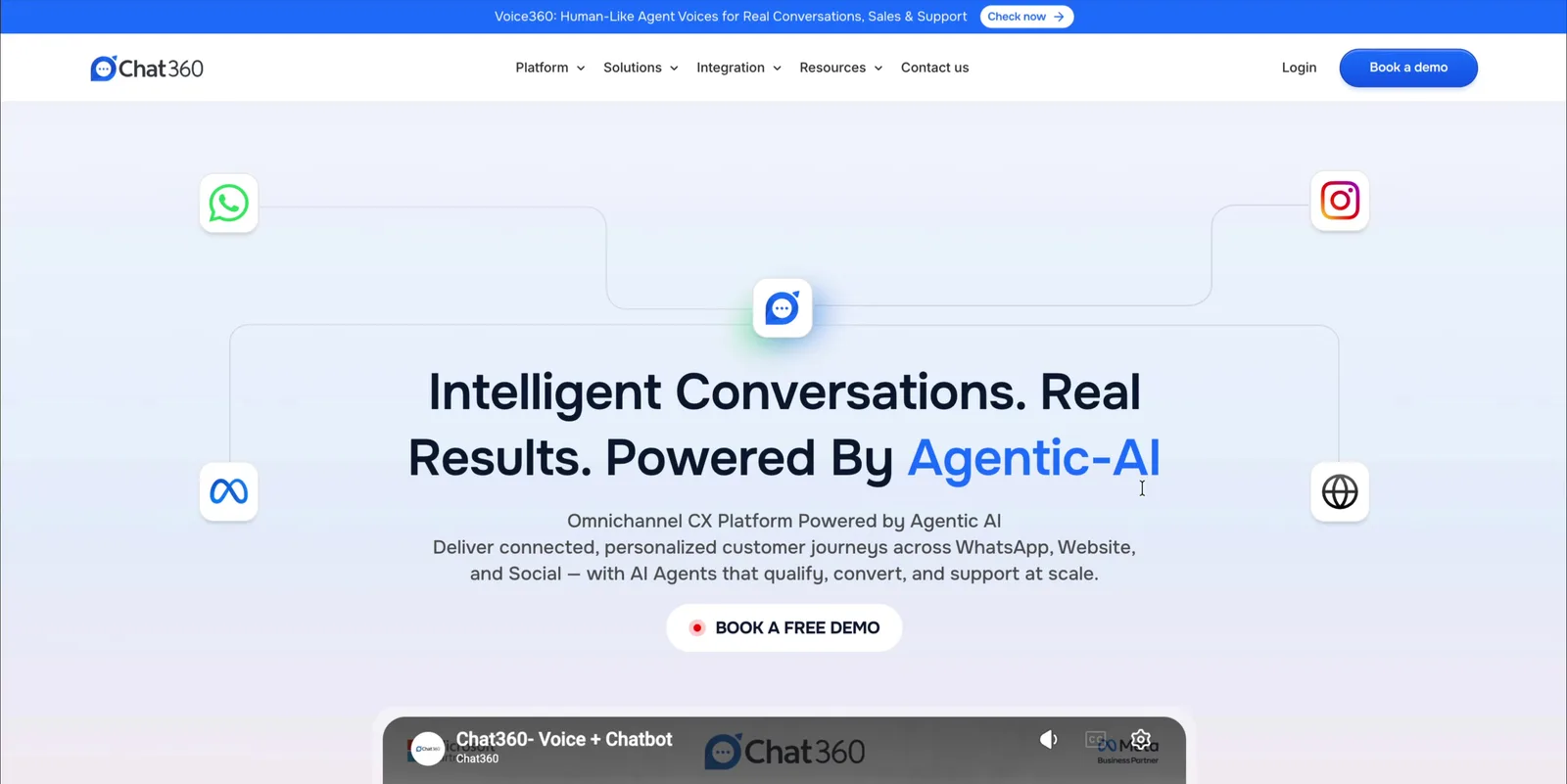 BeforeAfter
from the homepage within one month
homepage bounce rate
case studies and named testimonials
The homepage described channels and an older product. It never said what Chat360 achieves, offered no proof, and split visitors between two primary buttons.
Rebuilt the page as a buyer's sequence of questions: an outcome-led message, one demo CTA up front, use cases by industry, and customer evidence before the final ask.
+42% demo bookings from the homepage in the first month and a 68% lower bounce rate.
UI/UX designer
Research, structure, messaging and visual design.
Solo
Designed and shipped by one designer.
1 month
From audit to launch.
Live
On chat360.io.
01 · Context & business problem
The product had moved on. The homepage hadn't.
Chat360 is a B2B customer-experience platform. Its AI agents handle sales, support and engagement across WhatsApp, web, social and voice for brands in retail, finance, education, automotive and more.
The old page still sold a “Generative AI powered, no-code chatbot builder”, in its own words. The product had grown into agentic AI agents and a new voice product, Voice360.
The homepage is where most buyers form a first impression, and its commercial job is to turn visitors into demo requests. A page a release behind the product undersold it at exactly that moment.
Decision-makers in CX, sales and marketing evaluating conversational AI. They arrive already knowing WhatsApp. They need three answers fast: what will this do for my business, does it fit my industry, and who else trusts it?
A generic AI headline, four channel blurbs with platform stats, four solution cards and a row of blog posts. No outcomes, no customer voices, and two competing “main” buttons.
The homepage explained where Chat360 works, but never what it achieves. Buyers had to piece the value together, then choose between competing buttons, so too many left before asking for a demo.
02 · Success criteria
What “better” had to mean
One business metric, one engagement metric, and four design checks. Every decision later traces back to one of these.
More demo requests
Demo bookings that start on the homepage go up. This is the page's commercial job.
Fewer early exits
Bounce rate goes down: visitors find a reason to keep reading or act.
Clear value
The hero alone says what Chat360 achieves and for whom, in today's positioning.
One next step
A single primary action above the fold, repeated consistently.
Find your industry
A buyer sees their own industry within the first couple of scrolls.
Evidence before the ask
Customer results and named voices appear before the closing CTA.
03 · Research & evidence
What the old page was telling us
With one month and no research budget, I built the evidence base from what I could inspect directly.
Heuristic audit
Walked the live page as a first-time buyer and logged every point of friction.
CTA inventory
Counted every button, its label, its visual weight and where it led.
Content inventory
Mapped each section against the questions a buyer needs answered.
Positioning gap
Compared the page's language with what the product had become.
Scope note. No interviews or usability tests were run for this project. I treat these findings as strong signals for design direction, not as proof. The impact data later is what tests them.
Heuristic audit: seven points of friction
Rated by how directly each one blocked a buyer from understanding the value or taking the next step. Tap a pin on the old page, or pick a finding.
The old homepage · 7 findings
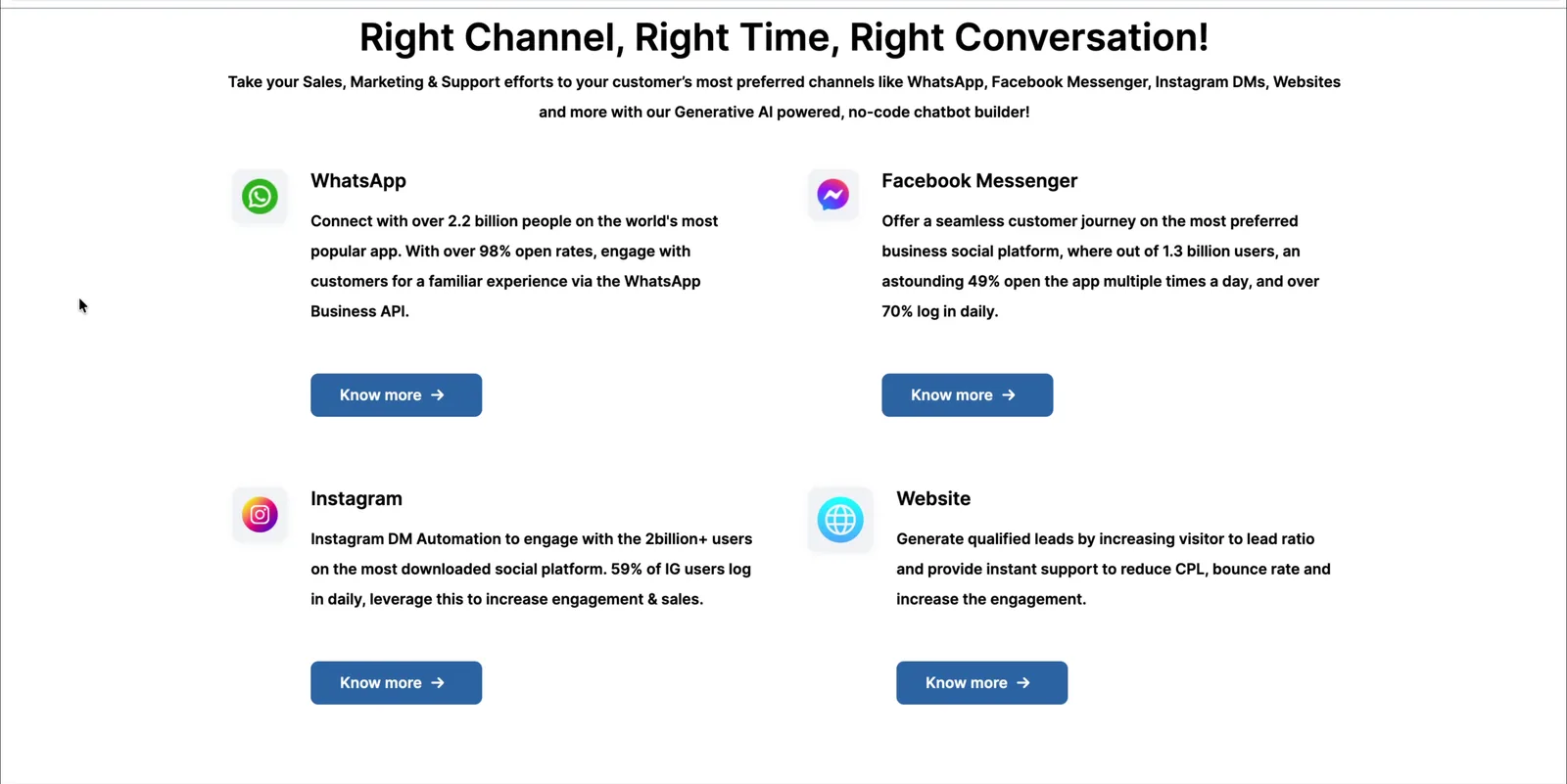
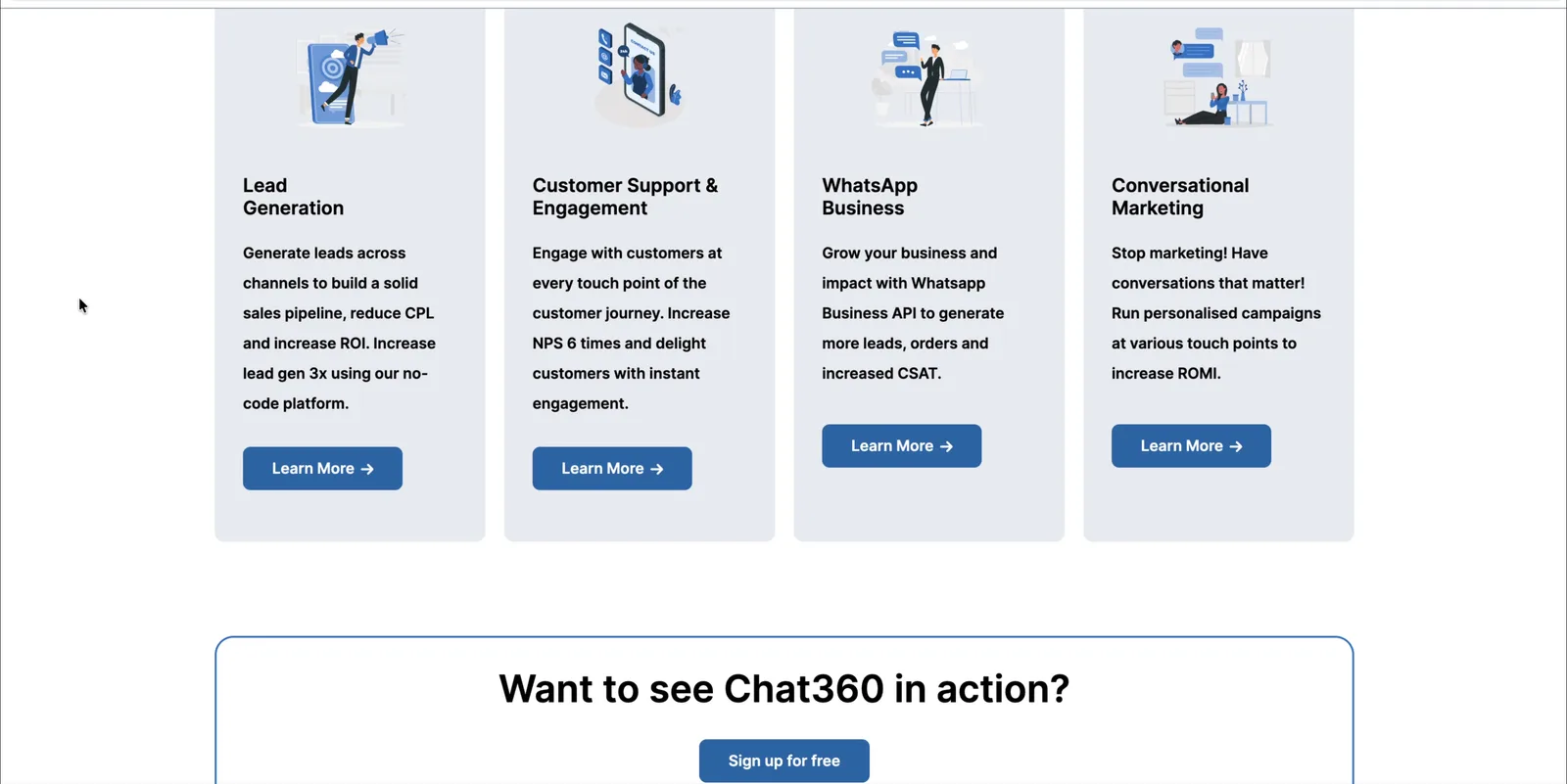
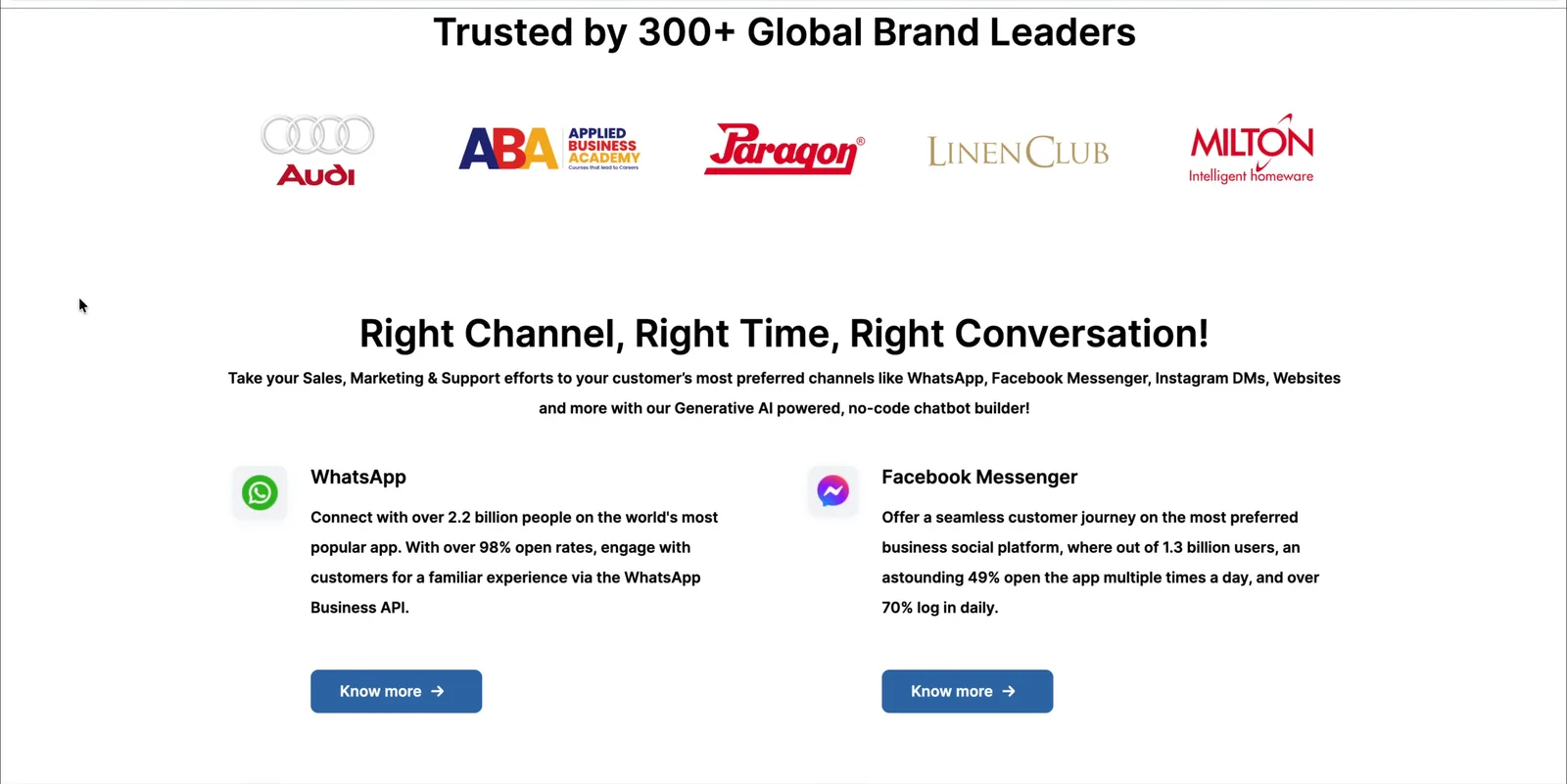
A category, not a promise
“Generative AI for Enhanced CX Engagement” could be any chatbot vendor. It names the technology, not the result.
Two “main” buttons
The nav makes Start Free Trial the filled button. Directly below, the hero makes Schedule a Demo the filled one.
Organised by channel
WhatsApp, Messenger, Instagram and Website each get a block of platform stats (“2.2 billion people”), not Chat360 results.
Eight identical blocks
Icon, paragraph, “Know more”; then icon, paragraph, “Learn More”. Eight times. Nothing stands out.
Proof was only logos
“300+ brands” and a logo strip. No testimonials, results or case studies.
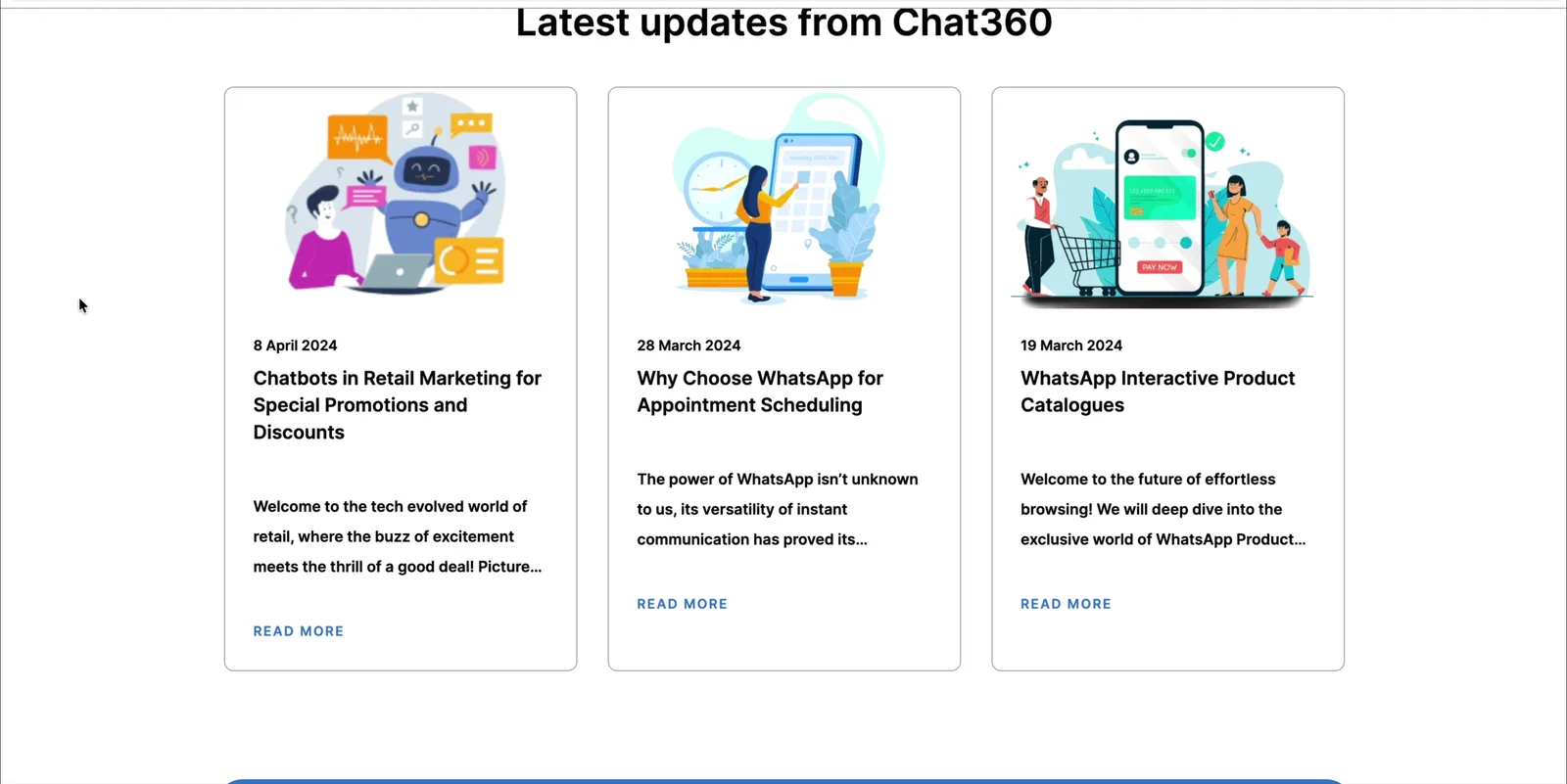
Blog posts in the trust slot
The space before the final CTA held three blog posts, not customer results.
Stock art instead of the product
A stock illustration of a hand holding a phone. Visitors never saw the product or the channels it connects. It's covered under Decision 6.
CTA inventory: 13 buttons, 5 labels, no single next step
Excluding Login. Eight of the thirteen led away from conversion, to channel and solution pages. The page never decided what it wanted the visitor to do.
Content inventory: which buyer questions did each section answer?
Most of the page answered “where does it work?” Almost none of it answered “does it work?”
| Old section | What is it? | Fits my industry? | What will it do for me? | Does it work? | What next? |
|---|---|---|---|---|---|
| Hero | Category only | Two options | |||
| Logos | Unsorted | Logos only | |||
| Channels ×4 | By channel | Platform stats | Know more ×4 | ||
| Solutions ×4 | By function | Learn More ×4 | |||
| Blog ×3 | |||||
| Closing | Demo |
04 · Key insights
Five insights that set the direction
Each insight shows the observation behind it, the evidence that was available, and why it mattered enough to shape the design. Letters refer to the four methods above.
Buyers judge outcomes, not channels.
The headline named a technology (“Generative AI for Enhanced CX Engagement”), and the largest section described WhatsApp, Messenger, Instagram and Website.
The content inventory (C) showed no section answering “what will it do for me?” in business terms. The channel copy quoted platform statistics such as “2.2 billion people” rather than results Chat360 delivered (A).
The page's buyers already use these channels. Telling them where Chat360 works gives them no reason to book a demo.
Lead every primary message with a business result, and treat channels as proof of reach rather than as the story.
A page with two primary actions has none.
The nav's filled button was Start Free Trial; the hero's filled button was Schedule a Demo.
The CTA inventory (B) counted 13 buttons with 5 labels, all in the same visual weight. Eight of them led to channel or solution pages rather than to a conversion.
Demo requests are the page's commercial job. When the page doesn't signal the next step, visitors have to decide for themselves, and many leave instead.
Give each stage of the page one job: demo above the fold, trial at the close, small links in between.
B2B buyers look for themselves.
Solutions were grouped by internal function (lead generation, support, WhatsApp Business, marketing). The logo strip mixed fitness, automotive, education and retail brands with no way to sort them.
The content inventory (C) found no section answering “does it fit my industry?” The existing page structure (A) showed that the customer base already spanned many industries.
A bank and a retailer evaluate the same product against very different problems. Seeing a peer's use case is the fastest route to relevance.
Organise use cases by industry and job, and let social proof be filtered by industry.
Claims need evidence next to the ask.
The slot just before the final CTA held three blog posts about catalogues, appointments and promotions.
The content inventory (C) showed “does it work?” answered only by a logo strip: no results, no testimonials, no case studies anywhere on the page.
A demo costs a buyer time and, internally, credibility. The page asked for that commitment without giving them anything to justify it.
Put case studies and named testimonials directly before the closing CTA.
The page was a release behind the product.
The copy described a “Generative AI powered, no-code chatbot builder”. Agentic AI and Voice360 were not mentioned.
The positioning gap review (D) compared the page's language with what the product had become: AI agents that act across channels, plus a new voice product.
Undersold positioning makes Chat360 look interchangeable with simpler chatbot tools, and leaves the newest product invisible to the people most likely to buy it.
Reposition around agentic AI and make room for Voice360 without letting the new product take over the core message.
How might we…
…say what Chat360 achieves in the first five seconds, in today's positioning?
…help a buyer from any industry see their own problem being solved?
…replace claims with proof, and give the page one clear next step?
05 · Constraints & considerations
The box I was designing in
One month, one designer
Audit to launch in a month, designed solo.
What I did: Prioritised structure and messaging over custom illustration or new components.
Evolve, don't rebrand
The page had to stay recognisably Chat360 for existing customers.
What I did: Kept the logo and a blue-led palette; brightened the blue and refreshed radius and contrast around it.
Proof needs real material
Case studies, quotes and logos can't be designed into existence.
What I did: Built the proof sections around the customer material available, in formats that scale as more arrives.
The homepage still has to rank
A slogan-only page loses the terms buyers search for.
What I did: Headings pair the promise with descriptive terms: “Omnichannel CX Platform”, “Agentic AI”, “WhatsApp”.
Three jobs, one page
Generate demos, launch Voice360, and keep the self-serve trial visible.
What I did: Gave each goal a position, not equal weight: demo leads, Voice360 gets a bar and a section, trial closes.
Easy to build and update
Marketing pages change often after launch.
What I did: A small set of repeatable section patterns instead of one-off layouts.
06 · Directions considered
Three ways to tell the story
The first decision was strategic: what should the homepage lead with? Three approaches were open. Each is judged against the success criteria and the insights.
Feature-led messaging
Lead with capabilities and channels: WhatsApp, voice, web, integrations, AI. Closest to the old page.
- Shows the breadth of the platform immediately
- Easy to maintain as features ship
- Leaves buyers to connect features to outcomes themselves (Insight 1)
- Hard to tell apart from other chatbot vendors
Industry-led messaging
Lead with industries: the visitor picks a sector and the page speaks to it.
- Creates relevance quickly (Insight 3)
- Uses the breadth of the customer base
- Fragments the story before the visitor knows what Chat360 is
- Visitors outside the listed industries feel excluded
- Needs a full content set per industry, which a one-month timeline can't support
Outcome-led messaging, with industry as the proof layer
Lead with the business result for everyone, then show it per industry and back it with customer evidence.
- Matches what buyers are trying to achieve (Insight 1)
- Keeps one story for every visitor, then lets each find themselves (Insight 3)
- Supports a single conversion path toward the demo (Insight 2)
- Fits within the timeline and the content that existed
- Outcome language can turn generic, so the industry jobs and case studies have to carry the specifics
Three smaller forks inside the chosen direction
Once the direction was set, three decisions still had more than one reasonable answer.
Fork
What is the primary action?
Lowest friction, but setting up AI agents across channels usually needs guidance, and a trial alone gives sales no conversation.
Keeps both audiences happy on paper, but recreates the split Insight 2 identified.
One clear ask up top; the trial catches visitors who reach the end but aren't ready for a call.
How should we prove it works?
Cheap and impressive at a glance, but logos show presence, not results.
Keeps the page fresh, but blog posts serve a learning intent, not a buying one.
Specific brands, specific outcomes, real people, placed right before the final ask.
Where does Voice360 go?
Maximum launch visibility, but it replaces the core platform story for every visitor.
Safe, but almost invisible for a new product.
Seen on every visit, explained in depth mid-page, and the hero stays about the platform.
07 · Information architecture
From a list of channels to a sales story
I ordered the page by the questions a buyer asks: what is it, who uses it, what can it do for me, does it work, what next. Anything that didn't answer one of them was cut or moved. Tap a section to see what happened to it.
Old page → new page
08 · Wireframes
Structure before style
Low-fidelity, desktop and mobile together, so every section had to work as a single column too. Scroll either one, or tap a note to jump to it.
Homepage · desktop + mobile · lo-fi
09 · Design decisions
Every major change, and why
The matrix summarises the decisions. Below it, each one is broken down: the problem, the decision, why it beat the alternatives, and the outcome it was expected to drive.
| Decision | Reasoning | Expected outcome | Criterion |
|---|---|---|---|
| Outcome-first headline | Buyers evaluate results, not technology labels (Insight 1); positioning had to catch up with the product (Insight 5) | Visitors grasp the value from the hero and keep scrolling | Clear value · Bounce |
| One demo CTA above the fold | Two primaries split attention (Insight 2); the demo starts a sales conversation | More demo requests from the homepage | One next step · Demos |
| Use cases by industry and job | Buyers look for their own problem (Insight 3) | Faster relevance, deeper scroll into use cases | Find your industry |
| Case studies + testimonials before the close | The ask needs evidence beside it (Insight 4) | Higher conversion at the bottom of the page | Evidence before the ask · Demos |
| Free-trial close with risk reducers | Late-stage visitors not ready for sales still need a step | A second conversion path that doesn't compete with the demo | Demos (indirect) |
| Product and real channels instead of stock art | Seeing the product reduces uncertainty (audit A) | Lower bounce, more confident demo requests | Clear value · Bounce |
| Voice360 bar + dedicated section | New product needed visibility without taking the hero (Insight 5) | Voice360 awareness while the core story stays focused | Clear value |
Decision
Lead with the result
The hero named a technology category (“Generative AI for Enhanced CX Engagement”) that any chatbot vendor could claim, and it described last year's product.
Rewrite the hero around the outcome, then name the technology: “Intelligent Conversations. Real Results. Powered By Agentic-AI”, with a sub-line naming the channels.
A feature-led hero would list capabilities and repeat the old problem. An industry-led hero would speak to one sector and lose everyone else. The outcome works for every visitor.
Fewer visitors leaving from the hero; more scrolling into the product.
We hypothesized that leading with the outcome and today's positioning would help first-time visitors understand Chat360's value within seconds, because buyers evaluate results, not technology labels.
One ask above the fold
The nav made Start Free Trial the filled button; the hero made Schedule a Demo the filled one. 13 buttons with 5 labels competed down the page.
Make Book a demo the only filled button in the nav and repeat it as the hero CTA. Move the trial to the close. Turn section CTAs into small links.
Trial-led would lower friction but give sales no conversation for a product that usually needs guided setup. Equal weight would recreate the split.
More demo bookings from the homepage.
We hypothesized that a single, consistent demo CTA above the fold would increase demo requests, because one clear next step removes the decision of which button matters.
Hero: Schedule a Demo (filled)
Hero: Book a free demo
Industry over channel
Four channel blocks and four function cards described where and how Chat360 works, not who it helps or with what.
Replace both with a “Business impact” carousel of seven industries, each tied to one concrete job and the agent's steps. Add industry filters to the logo section.
Keeping channels fails Insight 1. Grouping by function stays abstract and overlaps. Industry and job is how buyers describe their own problems.
Deeper scroll into use cases, and demo requests that start from a relevant example.
We hypothesized that organising use cases by industry and job would help buyers find relevant value faster, because they identify with their industry's problems, not with a messaging channel.
Evidence before the ask
“Does it work?” was answered only by a logo strip. The slot before the final CTA went to blog posts.
Replace the blog row with three case studies and a carousel of seven named testimonials, placed directly before the closing CTA. Move the blog to Resources.
A bigger logo wall shows presence, not results. A content hub serves learning, not buying.
Higher conversion at the bottom of the page.
We hypothesized that case studies and named testimonials just before the closing CTA would increase trust and conversion, because B2B buyers want evidence from peers before giving time to a demo.
Take the risk out of the last step
“Contact our team of experts” asked a visitor who wasn't yet convinced to start a sales conversation.
Close with a free trial, and put “Free 14-day trial” and “No credit card required” directly under the button.
Repeating the demo would offer nothing to visitors who already passed on it. A contact form asks for even more commitment.
A second conversion path for late-stage visitors, without competing with the demo up top.
We hypothesized that a free trial with “14 days” and “no credit card” at the close would capture visitors not ready for a call, because removing cost and commitment lowers the barrier to a first step.
Show the product, not stock art
A stock illustration of a hand holding a phone. Visitors never saw the product or the channels it connects.
Wire real channel logos into the Chat360 logo around the headline, and place a product overview video directly under the CTA.
A refreshed illustration would still be generic. A static screenshot shows the UI but not the omnichannel idea.
Lower bounce, and more confidence going into a demo.
We hypothesized that real channel logos wired into Chat360 and a product video in the first scroll would make the platform feel tangible, because seeing the product reduces uncertainty about what you're buying.
Launch without a takeover
The new voice product had no presence on the homepage at all.
Add an announcement bar above the nav on every visit, and a dedicated Voice360 section mid-page.
A hero takeover would replace the platform story for every visitor. A nav-only link would leave a new product almost invisible.
Voice360 seen on every visit; the hero stays focused.
We hypothesized that an announcement bar plus a dedicated section would raise awareness of Voice360 without diluting the core message, because returning visitors notice what's new while first-time visitors still get the platform story.
Inside Decision 3: seven industries, seven real jobs
Each card names one job and spells out the agent's steps, like “user calls on WhatsApp, voice AI fetches the bill from the ERP, explains the charges, sends a breakdown.”
Inside Decision 4: from claims to evidence
What a buyer could find on the homepage to answer “does this work for companies like mine?”
brands, filterable by industry
case studies: mCaffeine, JP Infra, Motilal Oswal
named testimonials, e.g. upGrad Abroad, BJS Toyota, Paragon
blog posts, moved to Resources
10 · Key trade-offs
What we gave up, on purpose
Every decision above cost something. These are the five tensions that shaped the page and why each one landed where it did.
Simplicity vs completeness
- Gained
- A homepage that tells one story: outcome, relevance, proof, action.
- Sacrificed
- Channel-by-channel detail and four solution descriptions.
- Why it was right
- That detail serves visitors who already know they want Chat360. They have the Platform and Solutions menus; first-time buyers need the story first.
Conversion focus vs content depth
- Gained
- Space before the final CTA for case studies and testimonials.
- Sacrificed
- The blog's homepage presence and the sense of fresh content it gave.
- Why it was right
- Blog readers have a learning intent and look in Resources. The homepage's job is a buying decision.
Single CTA vs multiple entry points
- Gained
- One unmistakable next step above the fold.
- Sacrificed
- Trial visibility at the top for self-serve visitors, and some purity: the page still offers a trial at the end and small links in between.
- Why it was right
- Insight 2 was about two primaries competing in the same place. Separating them by position (demo leads, trial closes) keeps focus without losing either audience.
Page length vs contextual clarity
- Gained
- Room for what the old page lacked: product, industries, Voice360, proof.
- Sacrificed
- Brevity. The page grew from 8 sections to 12.
- Why it was right
- Length is a cost only when sections don't earn their place. Each new section answers a buyer question the old page skipped, and the demo CTA is reachable from the first screen.
Launch visibility vs message focus
- Gained
- Voice360 seen on every visit, through the top bar.
- Sacrificed
- A hero-level launch moment, plus one more CTA label (“Check now”).
- Why it was right
- The platform story serves every visitor; Voice360 serves a subset. A bar plus a mid-page section balances both.
11 · Visual system
Brighter, rounder, more confident
Visual changes in service of the strategy. A brighter blue for the one action that matters, deep navy for weight, and soft blue-to-blush backgrounds that keep long sections light.
Square-cornered buttons in one blue, used for everything from “Know more” to the main CTA.
Pill buttons: filled blue for the main action, white for the repeat, small links for section CTAs.
Bold, centred section titles with one key phrase in blue (“Real Results”, “Agentic-AI”). The blue phrase is the promise.
Large radii and soft blue fills for features; blue-over-navy cards for industries so the carousel reads as one set.
Real channel and partner logos, product UI and customer photography instead of stock illustration.
One full-bleed blue gradient band, the only one on the page, so the trial offer can't be missed.
12 · Final design
The shipped homepage
Ten screens of the shipped page, top to bottom, on one board. Click it to enlarge.
13 · Validation & impact
How the direction was judged, and what happened
No usability testing was run. Confidence came from three places: checking the design against the buyer questions, checking it against the success criteria, and the business metrics after launch.
Before launch · the same buyer questions, re-asked of the new page
Running the same content inventory on the final design shows that every question the old page skipped now has a section that answers it.
| Buyer question | Old page | New page |
|---|---|---|
| What is it? | Technology category | Outcome-led hero, product video, platform section |
| Fits my industry? | Not answered | Logos filtered by industry, seven industry jobs |
| What will it do for me? | Platform stats, functions | One concrete job per industry, step by step |
| Does it work? | Logos only | 3 case studies, 7 named testimonials |
| What next? | Two competing primaries | Demo up top, trial at the close |
Before launch · signals that increased confidence
Each section of the new page maps to an insight, and each insight to an observation on the old page. Nothing was added for decoration.
One filled button above the fold, value stated in the hero, industry visible in the second scroll, proof before the close.
The case studies, testimonials and logos all come from existing customers, so the evidence section rests on real material, not placeholders.
After launch · business metrics moved in the predicted direction
The primary goal was demo requests; bounce rate was the early signal of whether the top of the page was working.
- One demo CTA in nav and hero (Decision 2)
- Case studies and testimonials before the ask (Decision 4)
- Industry use cases that show relevance (Decision 3)
The page asks for one thing up front and earns it with peer evidence on the way down. Both remove reasons to hesitate at the moment of conversion.
- Outcome-first headline (Decision 1)
- Product shown in the first scroll (Decision 6)
- Logos filterable by industry, right after the hero
Visitors understand the offer and see something relevant before deciding whether to stay. These are the changes at the top of the page, which is where bounce is decided.
Attribution. These are before-and-after results for the whole redesign, not an A/B test, so each decision's share of the impact is inferred from where it sits on the page and what it was designed to do. Traffic mix and campaigns can also move these numbers. Isolating them is first on my next-steps list.
14 · Reflection
Where the thinking goes next
Reflection
- Held upAn outcome-led message with one clear demo CTA would convert better than a channel-led page with competing buttons. Demo bookings rose 42% and bounce fell 68%, both in the predicted direction, though the share each change contributed is not isolated.
- Still unvalidatedThat buyers find themselves through industries. I don't yet know how often the industry tabs are used, or whether demos from different industries convert differently.
- Still unvalidatedThat more demos means better demos. The metric counts requests, not qualified opportunities.
- Still unvalidatedThat the Voice360 bar builds awareness without distracting from the demo CTA.
- Instrument the pageCTA clicks per section, scroll depth and industry-tab usage, to see which sections actually drive demos.
- A/B test the heroHeadline variants, to separate the copy's effect from the layout's.
- Consolidate CTA labelsThe page still mixes “Book a free demo”, “Book a Demo now”, “Try for FREE” and “Check now”. Test two labels against the current set.
- Talk to buyersInterview recent demo bookers and the sales team to check the five insights against real conversations.
- Track demo qualityDemo-to-qualified rate, so the gain shows up in pipeline, not just volume.
- Industry landing pagesEach industry card could open a page built for that buyer, with its own case study and proof.
- Demo booking flowThe homepage now sends more people to the demo form; the form itself is the next place friction could cost conversions.
- Case-study templateLead every case study with its headline metric so proof reads at a glance, on the homepage and on its own page.
- Trial onboardingVisitors who choose the trial at the close need a first-run experience that gets them to a working agent quickly.
- Mobile-first passA sticky demo button and shorter sections for small screens.
- Order is the strategy.A B2B homepage is a sales conversation. Getting the sequence of questions right mattered more than any single visual choice.
- Cutting is design work.Removing the blog row and channel stats is what made room for proof.
- A CTA is a product decision.Choosing demo over trial was a call about the sales motion, not a style choice.
Outcome
Said plainly, and it converted.
demo bookings from the homepage in one month
homepage bounce rate
case studies and named testimonials on the page
Chat360 homepage redesign · Product design case study · Old homepage from the Internet Archive